Migrate your client sites.
Paste up to 10 client site URLs. Impartial CMS crawls each one, rebuilds it with AI, audits it, publishes it and deploys it to Railway, all ten at once. Client sites that live in GitHub move straight from the repository, databases included. Then watch every site from one command center and send each client a branded report every month. Bringing more than 10 sites? Sales runs an assisted migration with you.
Illustration of a migration batch: 10 lanes, each site crawled, rebuilt, audited, published and deployed.
Client sites pile up faster than you can move them, or prove their worth.
Dozens of WordPress installs
Every client site is its own stack of core, theme and plugin updates, and each one can break on a Tuesday.
Rebuilds that never get scheduled
Moving a client to something better means weeks of copy-paste per site, so the portfolio stays where it is.
Hosting spread everywhere
Different hosts, logins and renewal dates for every client make simple changes slow and billing messy.
Value nobody sees
Clients see the invoice, not the uptime, fixes and leads behind it. Without a monthly report, the retainer is the first thing they question.
Prove your value every month.
Every client site is checked every 5 minutes and scanned every day, and one overview shows what needs you first. Every month, on the day you choose, each client gets a branded report of what their site did for them: visitors, leads, bookings, uptime and the work your team delivered.
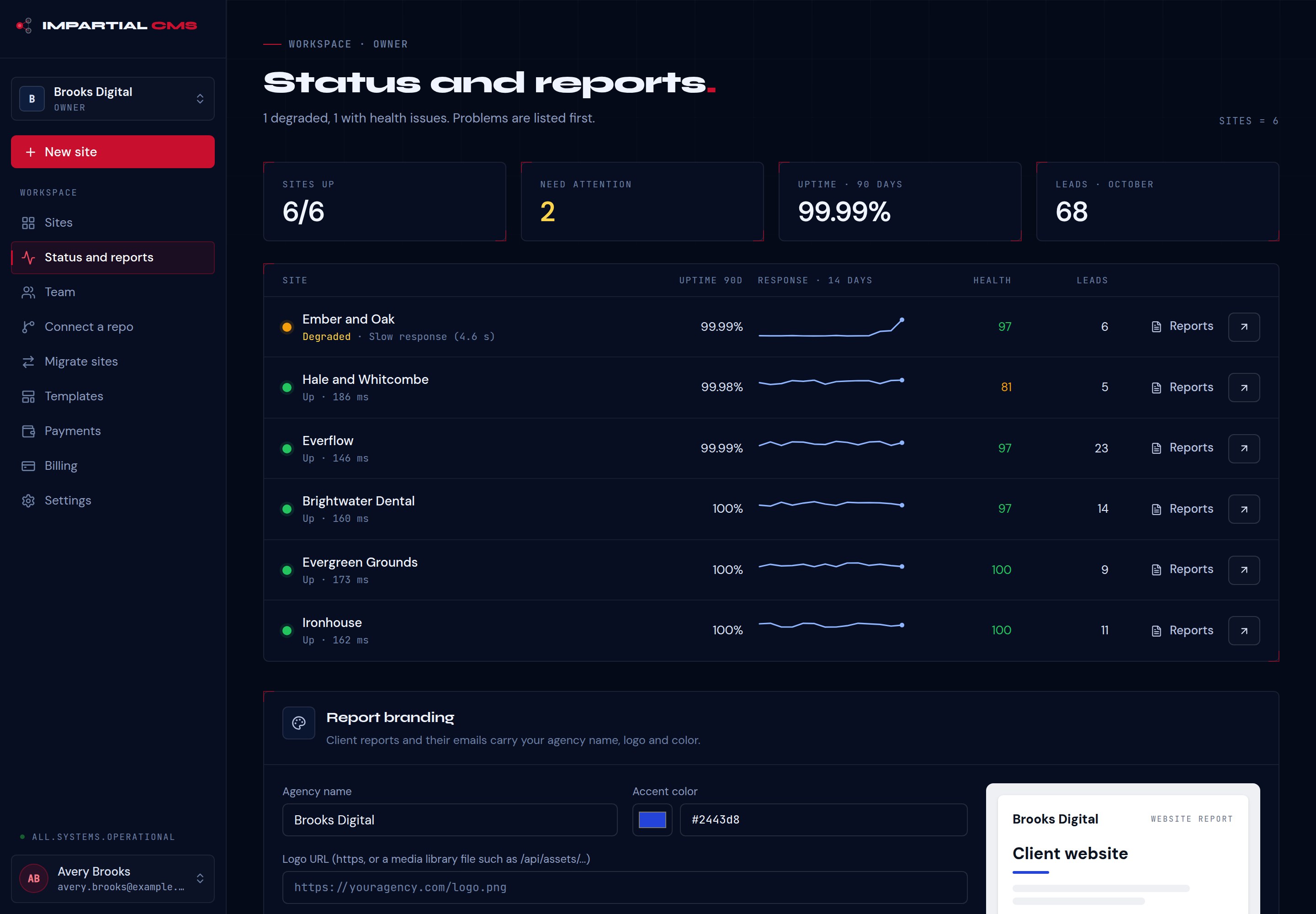
One command center.
Status, 90-day uptime, response time, health score and leads this month for every site in the workspace, with problems at the top.
- Uptime every 5 minutesStatus code, response time, certificate expiry, expected text and redirects. Email and Slack alerts after 2 failed checks, plus recovery notices
- Daily health scansBroken links, missing alt text, SEO regressions, page weight, mixed content and expiring certificates and domains, with Fix with AI for content issues
- Clients see only their sitesClient logins get the same view for the sites you share with them, and nothing else
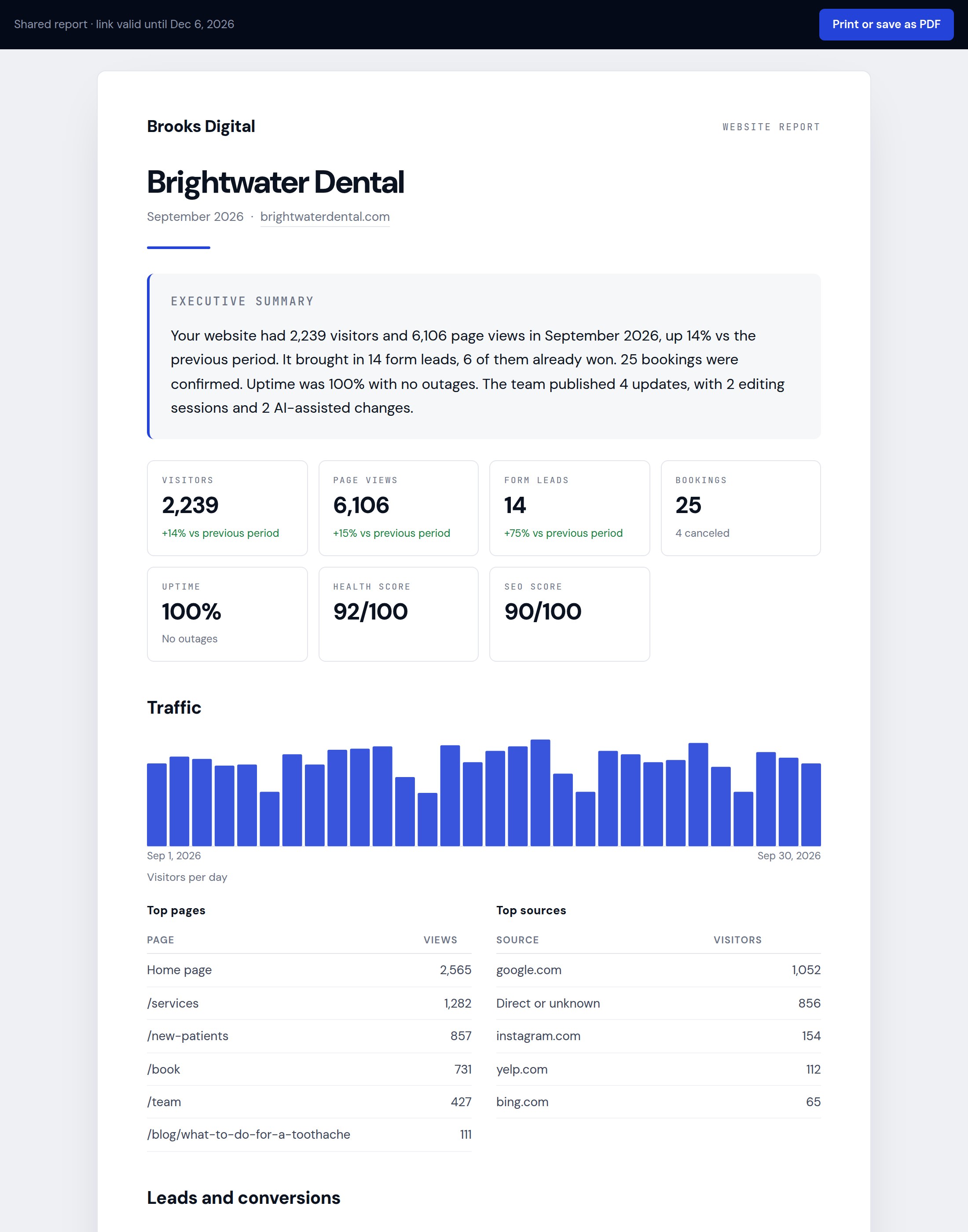
A report your client will actually read.
Branded with your agency's logo, color and Prepared by line, and built from the site's real data.
- Traffic, top pages and sources, leads by status and bookings
- Uptime and incidents, health score, SEO score change and content published
- A work log of publishes, edits and AI-assisted changes by your team
- An AI executive summary that only uses the report's own numbers, about 1 credit
- A private share link that expires and can be revoked, with no client login
- Print-ready PDF, and an automatic monthly email to the client
Monitoring and client reports are included on every plan, for every site. See monitoring and reports
Six steps, ten sites at a time.
You set the options once per batch. The board shows every site moving through the pipeline, with a live log, and failed steps can be retried individually.
- 01
Paste the list
Paste up to 10 client URLs or upload a CSV with a url column. Choose faithful rebuild or redesign, a theme, how many pages to crawl and where to host. Bigger portfolios go through sales.
- 02
Crawl and extract
Each site is crawled up to 40 pages deep. Copy, navigation, images, contact details, blog posts and brand colors are extracted.
- 03
Rebuild with AI
Faithful mode keeps the structure, copy and brand on modern blocks. Redesign keeps the content and applies a design system from the theme library.
- 04
Audit and fix
Every rebuilt site is audited for SEO, links and accessibility, and the fixes are applied before anything is published.
- 05
Publish and deploy
Sites go live on Impartial hosting, or each one gets its own Railway project built from its GitHub repository.
- 06
Cut over cleanly
Import the redirect map from old URLs to new ones into each site's redirect manager in one click, or download it as a CSV, plus a DNS checklist with the exact records to change per domain.
Every client on their own infrastructure.
Connect GitHub and Railway once. Each rebuilt site can get its own Railway project, built from its own GitHub repository with a zero-dependency Node server, and redeployed on every sync. Or keep them all on Impartial hosting; you choose per batch.
- One Railway project and service per site
- Built from the site's GitHub repository
- Generated domain immediately, custom domain when DNS is ready
- Every publish syncs to GitHub and redeploys
Migrate client apps straight from the repository.
Pick repositories across your account and your clients' organizations. Apps with a database launch on Railway with the database provisioned and wired in, and sites built with a framework Impartial Connect supports stay editable in the CMS. Static and marketing repositories can be rebuilt as Impartial CMS sites from their own HTML and Markdown instead.
- Analyzed before anything changesFramework, build commands, databases, email providers and required environment variables, each with its evidence
- Databases includedPostgres, MySQL, Redis and MongoDB from Railway's official templates, wired with reference variables; migrations run before every deploy
- Secrets never keptValues are encrypted, written to Railway, then deleted. Only the names stay
- Live logs and retryBuild logs, an HTTP check once the app answers, and retry from any step on the batch board
Bring the data with you: connect the existing database, or import it with a one-off pg_dump, mysqldump or mongodump job, with the manual commands shown if it fails. Repositories count toward the same 10-site self-serve allowance.
Cut over without losing a link.
Every batch produces the paperwork for the switch: a redirect map so old URLs keep working, which imports into the site's redirect manager in one click, and a DNS checklist per client domain.
- Lower TTL on harborviewdental.com to 300
- CNAME www to harborview-dental.up.railway.app
- Apex: ALIAS or forwarding to www
- TXT _railway-verify.www for SSL
- Upload redirects, then retire the old host
Grow every client site.
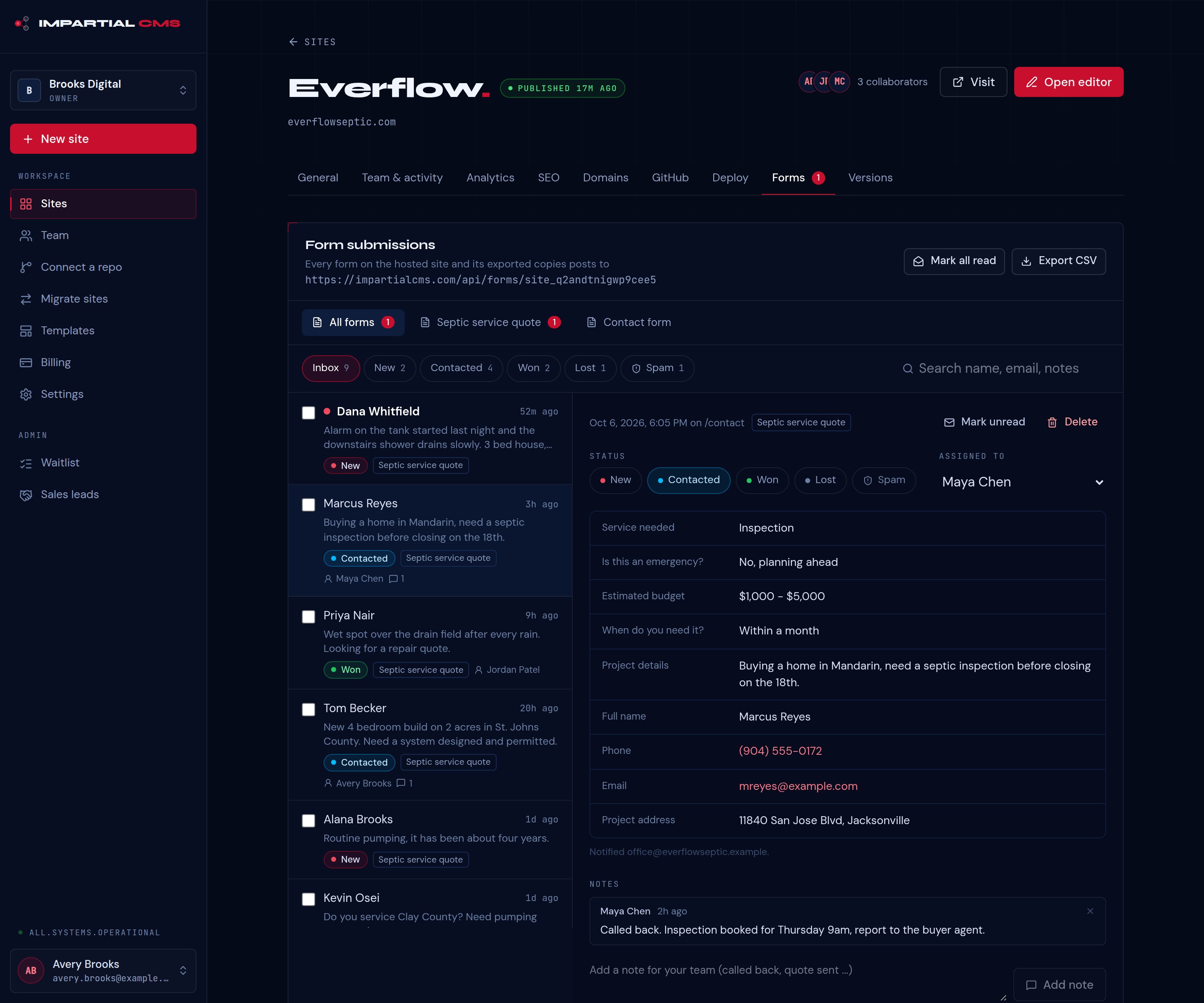
Show clients results, not just a new site. Every site you run gets a lead inbox, online bookings, an AI content engine, AI translation and the SEO suite, with no plugins to install or license per client.
- Lead inbox with assignmentStatuses from New to Won, notes, and leads assigned to teammates. You choose per site whether the client sees the inbox
- Bookings and paymentsClients take bookings with card deposits through their own BrightStar Impact merchant account, with no platform fee. Share bookings with them read-only
- A blog that keeps publishingThe content engine plans and drafts articles in the client's voice; clients review and comment, and nothing goes live without approval
- Multilingual client sitesAdd Spanish or any other language and the AI translates the site in about a minute; clients can edit their translations
- Rankings carried overImport a migration's redirect map into the redirect manager in one click; structured data and sitemaps come with every site
Included on both plans; AI translation and content use your normal credits. See forms and leads
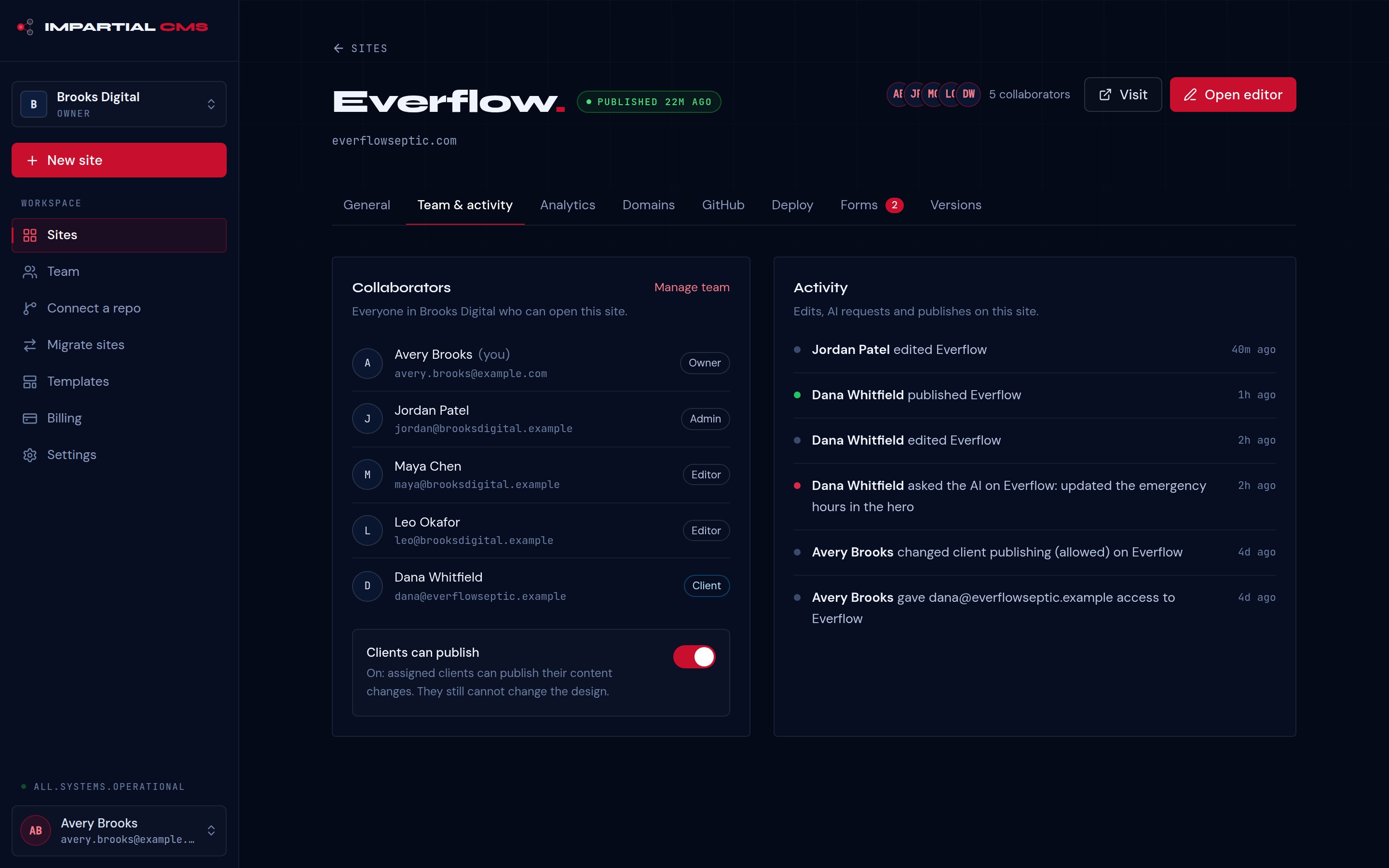
Your studio and your clients, one workspace.
Invite your team and your clients by email. Editors design and publish every site; clients update their own text, images and blog posts without ever touching the design, billing or anyone else's site.
- Owner, admin, editor and client roles10 team seats on Agency, unlimited client logins
- Content-only clientsNo theme, layout or section deletes. Enforced on the server and in the AI
- Clients can publishAn optional switch per site, off until you turn it on
- Activity logPublishes, edits, AI requests, invites and role changes per site
Every member's AI use draws on the workspace credits, and ownership can be transferred with billing. How teams work
Agency.
For agencies moving and running client sites at scale.
or $1,428 billed yearly
- Unlimited hosted sites
- 4,000 AI credits every month (about 30 full site builds)
- Self-serve migration of up to 10 client sites, all 10 rebuilding at once
- Migrate client apps from GitHub to Railway, with their databases
- More than 10 sites? Assisted migration through sales
- Each rebuilt site deployed to Railway automatically
- 10 team seats with owner, admin and editor roles
- Unlimited client logins with content-only editing of their own sites
- Everything in Pro
- Branded client reports and uptime monitoring for every site
- Priority support
Running fewer sites? Compare Pro and Agency
Bringing more than 10 sites? Talk to sales.
Self-serve migration covers up to 10 client sites, all rebuilding at once. For a bigger portfolio we plan the move with you: batches, rebuild style, redirects and the DNS cutover per client, and we raise your account's limit to match.
Talk to salesJacksonville, FL. We respond within one business day.
Before you move a portfolio.
How does agency migration work?
Paste up to 10 client site URLs or upload a CSV. The CMS crawls each site, rebuilds it with AI (faithful to the original or a redesign), audits and fixes it, publishes it and can deploy each one to Railway, with all ten rebuilding at once. You get a redirect map CSV and a DNS checklist for every site. Client sites that live in GitHub can be migrated from the repository instead, databases included. Bringing more than 10 sites? Talk to sales and we plan an assisted migration with you.
Can I migrate client sites straight from GitHub?
Yes, on Agency. Connect GitHub and Railway, then pick repositories across your own account and your clients' organizations. Every repository is analyzed before anything changes: framework, build and start commands, databases, email providers and the environment variables the code expects, each with the evidence it was found in. Apps are deployed as they are to their own Railway project, with live build logs, an HTTP check once they answer, and retry from any step on the batch board. Sites built with a framework Impartial Connect supports stay editable in the CMS after the move. Static and marketing repositories can instead be rebuilt as Impartial CMS sites from their own HTML and Markdown. Repositories count toward the same 10-site self-serve allowance; larger portfolios go through sales.
What happens to a client app's database and secrets?
Postgres, MySQL, Redis and MongoDB are provisioned on Railway from Railway's official templates and wired to the app with reference variables, and a detected migration command runs before every deploy. You can keep the existing database by connecting to it, or import its data with a one-off job (pg_dump, mysqldump or mongodump); if an import fails, the commands to run it by hand are shown. Secret values such as API keys and database URLs are encrypted, written to Railway and then deleted from Impartial CMS; only their names are kept.
Faithful rebuild or redesign?
Faithful keeps the client's structure, copy and brand colors and maps them onto modern blocks. Redesign keeps the content and applies a fresh design system from the theme library. You choose per batch.
Will old URLs and search rankings survive the move?
Every rebuilt site comes with a redirect map from old paths to new ones, as a CSV and as a one-click import into the site's redirect manager, plus a DNS checklist with the exact records to change, so you can cut over each client domain without broken links.
Do I need a Railway account?
Only for dedicated deploys and for repositories migrated as running apps. Sites can live on Impartial hosting with no extra account. Connect your GitHub and Railway accounts once and each migrated or selected site gets its own Railway project, built from its GitHub repository, with a generated domain. To use your own domain, add it in the site's Deploy tab: we attach it to the Railway service, show the CNAME and TXT records to add at your DNS provider with their status, and Railway issues the HTTPS certificate. Sites connected with Impartial Connect can link the Railway service that hosts them, which fills in their live URL and gives them the same domain setup.
Which plan includes migration?
Self-serve migration of up to 10 sites, from URLs or GitHub repositories, is part of the Agency plan ($149 a month or $1,428 a year), which also includes unlimited hosted sites. Larger portfolios move through sales as an assisted migration, and we raise your limit to match, so a whole portfolio fits on one subscription.
How do client reports help an agency keep clients?
Clients rarely see the work behind a website. Each month a branded report shows them what their site did: visitors, leads, bookings, uptime, health and SEO, the articles published and the work your team logged, opened from a private link with no login or emailed automatically. The Status and reports overview shows every client site's status, uptime, health score and leads this month with problems first, so you fix issues before the client notices. Clients who sign in see only their own sites.
What do monitoring and client reports include?
Every published site is checked every 5 minutes for its status code, response time, certificate expiry, expected text and redirects, with email and Slack alerts after two failed checks and a notice when it recovers. Daily health scans look for broken links, missing alt text, SEO regressions, heavy pages, mixed content and expiring certificates and domains, with Fix with AI for content issues. Monthly client reports carry your agency's logo and color and cover traffic, top pages and sources, leads by status, bookings, uptime, health, the SEO score change, content published and a work log, with an AI executive summary that only uses the report's own numbers (about 1 credit). Share a report with a private link that expires and can be revoked, with no client login, print it to PDF, or have it emailed to the client every month. Monitoring and reports are included on every plan.
How do multi-language client sites and leads work for an agency?
Any client site can run in several languages, translated by AI and editable by the client like any other content. Each site's forms feed a lead inbox where your team sets statuses, adds notes and assigns leads to teammates; you choose per site whether clients see the inbox. Migrated sites come with their redirect map, which imports into the redirect manager in one click.
Can customers book and pay online?
Yes, on both plans. Visitors choose a service, a staff member, a date and a time in their own time zone and get an instant confirmation with a calendar invite. A service can take a deposit or full prepayment by card through the business's BrightStar Impact merchant account, applied for from the dashboard; card details are entered on a secure payment page and never touch our servers. Until the merchant account is approved, paid services are paid at the appointment. Reminders go out 24 hours ahead, customers can reschedule or cancel within the window you set with automatic refunds, and per-staff hours, time off, buffers, group classes and party sizes keep the calendar free of double bookings. You can also sell gift cards and simple products with a Buy button, and the AI builder can set up booking for salons, clinics, studios, consultants and restaurants.
How does the AI content engine work?
It plans topic clusters and 12 to 24 article ideas for a site, each with a focus keyword, search intent, outline, internal links and a call to action, then drafts articles in the brand voice it learns from the site's own copy and reviews each draft against the SEO checklist. It never invents statistics, quotes or reviews, flags claims it cannot verify with [verify], links only to pages that exist and adds disclaimers for legal, medical and financial topics. Nothing publishes without approval: approve and schedule, request changes or edit in the visual editor, and let clients review and comment. An optional autopilot writes 1 to 3 drafts a week for your approvers; auto-publish after a no-objection window is opt-in and never used for regulated industries. A plan uses about 20 to 33 credits and an article about 25 to 37, shown before every run.
Can a site send email from the business's own domain?
Yes, on both plans. The workspace owner or an admin connects Postmark, SendGrid, Resend, Mailgun or Amazon SES for one site or as the workspace default, with setup steps for each provider. Form notifications and auto-replies, booking and order emails, and client reports then go from the business's own address on its verified domain. The domain is checked, you can send a test email, and every delivery is logged. If the provider fails, owner notifications still arrive through Impartial CMS, and customer emails fall back only if you allow it. Credentials are encrypted and never shown again. Account emails such as password resets and billing always come from Impartial CMS.
Can my team and my clients work in the same account?
Yes. Every account has a workspace. Invite teammates and clients by email; invite links work for 7 days, even during early access. Owners handle billing and can transfer ownership, admins manage the team, and editors edit, design and publish every site. Pro includes 2 team seats and Agency includes 10 team seats, with unlimited client logins. Every member's AI use draws on the workspace's credits, and an activity log shows who published, edited, asked the AI, invited or changed roles, per site and across the workspace.
What can a client change on their site?
Clients edit text, images and blog posts on the sites you share with them. They cannot change the theme or layout, delete sections, see billing or see your other sites, and this is enforced on the server and in the AI, which also works for clients but only for content edits. Publishing is up to you: turn on Clients can publish per site, or keep publishing with your team.
Can I use my own Claude API key?
Yes, on both plans. Add your Anthropic API key in Settings and every AI feature (builds, edits, content, translation, SEO and migrations) runs on your key and is billed by Anthropic, with no credits used. In a team workspace the owner's key covers every member.
Who owns my sites and content?
You do. Export any site as clean static HTML at any time, sync it to your own GitHub repository on every publish, or deploy it to your own Railway project. Connected sites never leave your repository; we only write the commits you approve.
Move your client sites this week_
Paste up to ten client sites and watch them rebuild at once. More than ten? Sales plans the move with you.